|
|
e! My'Net'Assisatant™ 6.12 for Windows®
Accelerate, Optimizing Your Internet Connection
e! My'Net'Assisatant is a professional internet connection accelerator. It can fundamentally optimize your internet connection speed by up to 300% and support all types of connections from dialup to DSL, Cable, and Wireless.
Purchase a License
NO Ads, Nags or Spyware! Virus-FREE!
Designed for Windows® 98, Me, 2000 and XP, with basic support for Windows® Vista™
other mirror download
mirror1
mirror2
|
|
Keep informed about special offers and updates!
Your privacy is ensured by our
privacy policy.
|
Download and Installation Instructions
To download and install e! My'Net'Assisatant please follow these instructions.
1. Click the green download button above to start the download.
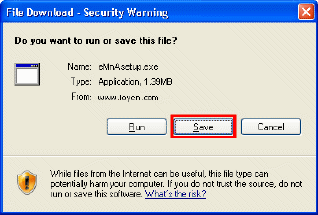
2. When the File Download dialog box appears click the “Save” button.
3. When the Save As dialog box appears choose a folder location and save the file to a known location on your computer, for example, to your Desktop.
4. Wait for the file to download and then close all applications including the browser.
5. Double-click on the saved file icon to start the installation process.
6. Follow the prompts within the installer to
complete the installation of e! My'Net'Assisatant. For more detailed
instructions on this process please
click here.
|
|
|
|
e! My'Net'Assisatant is a internet accelerator of LoySoft in the United States and/or other countries. All other trademarks are property of their respective owners.
|
Questions
If you have any questions
please
contact us
and we will be happy to answer them!
|
|
|